Hall-effect keyboards: a practical buyer's guide
Rapid trigger, per-key actuation depth, analog axis output — Hall-effect keyboards deliver all three, but only if the firmware matches the hardware. Here is what to look for, what to pay, and who should skip the category entirely.
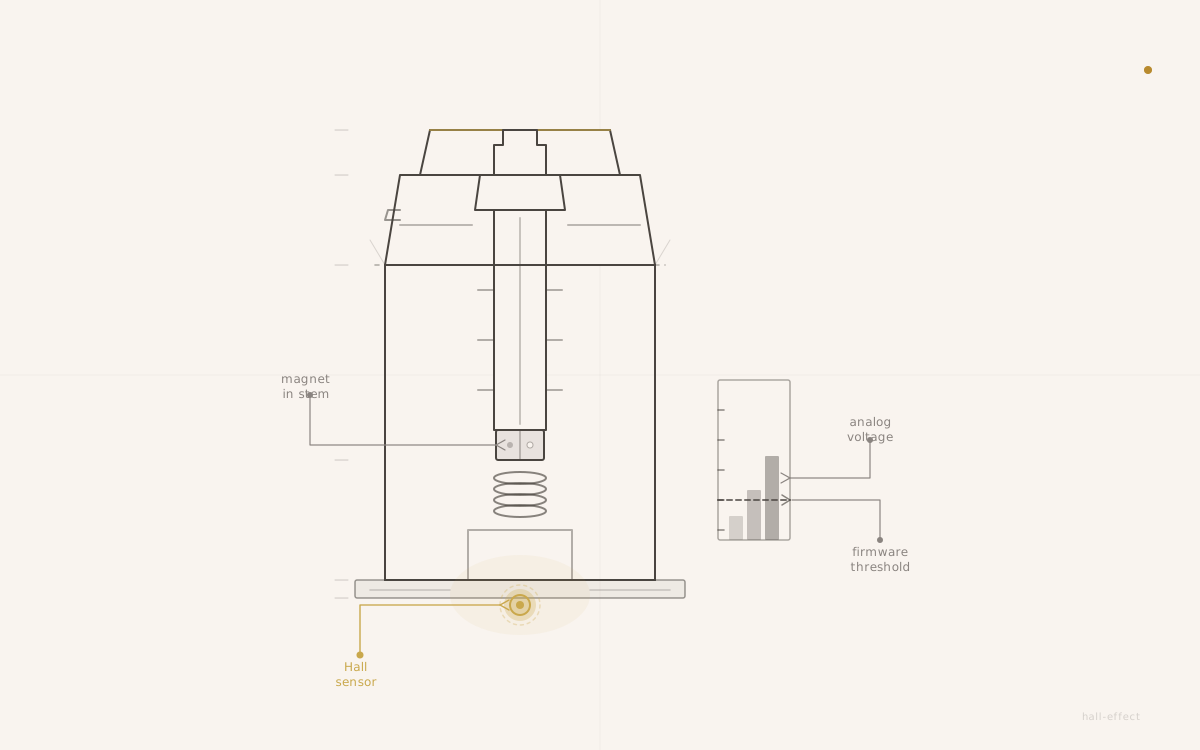
The technology is documented and the market trajectory is clear. What the existing articles don't answer is the purchase question: should you buy one, and if you do, what should you look for?
The answer depends almost entirely on one variable — which features you actually need.
Who actually benefits from Hall-effect
Hall-effect keyboards exist to expose the analog signal underneath a keypress. That signal enables three things that are impossible on MX-lineage hardware.
Rapid trigger is the primary draw for competitive FPS and battle-royale players. On a standard MX switch, the actuation point is fixed at a physical depth — typically 2mm down — and the reset point is fixed 0.5mm above that. The key must rise past the reset before the controller accepts another press. On a Hall-effect board with rapid trigger enabled, the firmware resets as soon as the stem rises by a configured delta — as small as 0.1mm to 0.4mm in practice, compared to a fixed 0.5mm on a standard MX. For movement inputs in games where first-shot speed and stutter-stepping matter, the difference is real and measurable.
Per-key actuation depth lets a player configure each key position independently in firmware. WASD shallow for fast re-press, function row deep to prevent stray brushes — both on the same board, same switches, different firmware thresholds.
Analog axis output maps a key's travel curve to a USB HID gamepad axis rather than a button event. A racing or flight sim game that accepts controller input can read the W key as a throttle curve rather than a binary on/off. This is a niche use case with a narrow game compatibility list, but it is an architecture that no MX board can replicate at any price.
The three features that matter — and what they require
Each capability has a prerequisite chain: the board must support it, the configurator must expose it, and the user must set it up. Missing any link in the chain means the feature does not function.
Rapid trigger requires a board with Hall sensors on every key position (hardware), a configurator that exposes the reset-delta parameter per key (software), and the user actually setting the delta (setup). Boards that ship the hardware but omit the per-key rapid-trigger control from the configurator deliver the polling numbers without the usable feature.
Per-key actuation depth requires the same sensor foundation plus a configurator that lets the user set an independent threshold per key. Many budget boards expose a single global actuation slider rather than per-key control, which degrades the feature to a slightly adjustable standard keyboard.
Analog HID axis requires a board that supports HID gamepad descriptors alongside the keyboard descriptor, a configurator that lets the user bind the axis mapping, and a game that accepts the gamepad input. This is the most frequently miscommunicated feature in the category — the board must support it explicitly, and most budget boards don't.
The firmware-shallow problem is real. A number of Hall-effect boards ship with competitive sensor hardware and a configurator that exposes only basic key remapping. The gap between what the hardware can do and what the software unlocks is the most common source of buyer disappointment in the category.
What to look for when buying
The spec sheet is not the checklist. The checklist is about configurator quality and manufacturing tolerance.
Configurator quality. Browser-based configurators (no install, works on any OS) are the current standard for enthusiast boards. Desktop-only configurators introduce friction and Windows dependency. Firmware-only configurators — where rapid trigger depth means editing a config file and reflashing — are reserved for builders who are comfortable with that workflow. For most buyers, the question to ask is: can I set actuation depth per key in a GUI without editing code?
Calibration routine. Hall sensors drift over time as the resting voltage of each key position shifts with temperature and mechanical settling. Boards address this with calibration routines — some automatic on startup, some triggered by a key combination. Before buying, confirm the board has a calibration routine and understand how to run it. A board without a calibration mechanism will develop inconsistent actuation depths over months of use.
Magnet tolerance grade. The magnet pressed into each stem determines how consistently the sensor reads the same position across every key. Budget builds use loose-tolerance magnets that produce actuation variance across the cluster; enthusiast-grade builds spec tighter magnets and sell that consistency as a feature. If uniform WASD behavior matters, the tolerance grade matters.
Hot-swap vs. soldered. Hall-effect switches are not universally interchangeable. Some boards use proprietary switch sockets that only accept the vendor's own magnetic switches; others use standard MX-footprint sockets that accept any Hall-effect switch with an MX housing and a compatible magnet-stem geometry. Confirm socket compatibility before buying loose switches.
Switch interchangeability. Related to the above: if the board uses an open magnetic switch standard, switches from different makers can be installed. If it uses a proprietary socket, the vendor controls the switch market for that board. Proprietary sockets are not inherently bad — they let the vendor control the full sensing stack — but they constrain the upgrade path.
Switch feel: what Hall-effect changes and what it doesn't
This is the point most buyers get wrong coming from gaming content.
The sensing architecture does not change how the stem and spring feel on the way down. A Hall-effect switch can be specced to feel identical to a quality MX linear if the spring weight, housing geometry, and lube are matched. The Gateron Magnetic Jade is a clear reference: standard spring weight, MX housing geometry, the same feel variables — spring rate, lube, stem material — as any MX switch. The only difference from a non-magnetic MX switch is the small permanent magnet in the stem and the Hall sensor on the PCB underneath. The press itself is indistinguishable from a well-specced MX linear to most hands.
What Hall-effect does change is the post-press firmware behavior — the reset window, the actuation threshold, the analog output mapping. The press is the same. The electronic behavior of the press is different.
The feel ceiling for Hall-effect switches is still below the boutique MX linear market at equivalent price points. The best MX linears — the Oil King-tier, the HMX Cloud tier — are the product of a tuning ecosystem that has been iterating for years: housing geometry, leaf design, resin blends, lubricant compatibility. Hall-effect switches are optimized for sensor consistency and magnet geometry, which is a different manufacturing discipline. A $1.50/switch Hall-effect linear does not sound or feel like a $1.50/switch enthusiast MX linear. Buyers who prioritize sound character and bottom-out feel over competitive features should stay in the MX market.
The tradeoffs buyers routinely underestimate
Three tradeoffs come up consistently in the first month of ownership.
Calibration drift. The Hall sensor's reading is a function of the absolute distance between the magnet and the sensor pad. That distance can shift over months as the switch housing settles, the PCB flexes slightly under repeated use, and the rest position of the stem changes by tens of microns. The result is that the actuation threshold the board was calibrated against no longer corresponds to the same physical depth. Boards with good calibration routines make this easy to correct; boards without one allow the drift to accumulate silently. Run a calibration whenever the board starts feeling inconsistent — not on a fixed schedule, but as a diagnostic response.
Firmware complexity. More features equal more surface area for bugs. Early Hall-effect software had a higher rate of edge-case issues — sticky keys after rapid-trigger reconfiguration, calibration routines that failed on specific key positions, configurator state lost on disconnect — than comparable MX-lineage launches at the same price. The category has matured considerably since 2024, and the gap is closing, but it has not closed. Buyers buying into a first-generation HE firmware stack from a new vendor should expect a rougher experience than a board running mature QMK or VIA on MX switches.
The feel ceiling. As noted above, a Hall-effect board at $150 is not going to feel like a $150 MX custom. The best Hall-effect builds deliver the feature set and a respectable linear feel; they do not deliver the acoustic signature a well-tuned MX build can hit. Buyers who want both — the feel of an Oil King build and the configurator depth of a Wooting — are asking for something the market does not yet offer at any price.
The pricing reality
Hall-effect adds manufacturing cost. Per-key Hall sensors, tighter magnet tolerances, and the PCB complexity that supports analog-per-key scanning all cost more than a standard contact-closure PCB. That cost flows into the price.
Budget Hall-effect boards in the $80–$120 range exist and they are real keyboards. They cut corners on configurator depth — often a desktop-only app, often no per-key actuation control — or on calibration quality. The polling numbers may be high and the hardware may have Hall sensors under every key; the software that uses those sensors is where the compromise sits.
The enthusiast tier at $150–$250 is where the firmware typically matches the hardware. Per-key rapid trigger is exposed in a browser configurator, calibration is reliable, and the magnet tolerance is tight enough that WASD behavior is consistent across the cluster. This is not a marketing tier claim — it reflects the manufacturing-yield difference between the two price bands. The Keychron Q Ultra ZMK, arriving in 2026 with an 8K polling ceiling and a browser-configurable ZMK stack, is a current prebuilt that sits squarely in this range.
A Hall-effect board at $90 can be a fine purchase if the buyer understands what they are getting: a board with analog sensing hardware and a configurator that may not fully exploit it yet. It is not a substitution for a $200 board that has both the hardware and the software.
The decision frame
The purchase decision is not about Hall-effect being better than MX. It is about which feature axis matters to the buyer.
If rapid trigger is required — competitive shooters, movement inputs where 0.1–0.4mm reset windows are meaningful — Hall-effect is the only option. No MX board delivers it. The configurator overhead and the calibration discipline are the cost of the feature.
If analog axis output matters — sim racing, flight sims, any game that benefits from a continuous throttle or steering input from a keyboard — Hall-effect is again the only architecture that provides it.
If neither of those features is relevant, the MX ecosystem gives more feel variety, a more mature modding ecosystem, simpler firmware, and lower cost at every price tier. There is no shame in that outcome. The honest tradeoff is that MX is the better keyboard for most buyers; Hall-effect is the better keyboard for the specific buyers who need what only Hall-effect provides.
The Trends Tracker shows Hall-effect consistently among the top-moving categories. That attention is real. But the tracker measures interest, not fit. Know which side of the feature partition the build sits on, and the right purchase is obvious from there.
Keep reading
- Trends
How Hall-effect quietly became the new mid-premium default
The polling-rate hype is loud and easy to wave off — 8K, 32K, numbers chasing each other up the spec sheet. The quieter story is that the magnetic-switch tier has stopped being a Wooting-shaped niche and has settled into the $100–$230 prebuilt slot the scene actually buys from. The volume has moved, not just the marketing.
thock7 min read - Trends
Gaming Boards Are Winning the Spec War, and Enthusiasts Are Paying Attention
Hall-effect sensors and Rapid Trigger have done what RGB lighting and polling-rate marketing never could: closed the spec gap between gaming keyboards and enthusiast builds at the hardware layer. The divide persists in culture and community, but at the switch and firmware level, the lines are dissolving.
thock8 min read - Deep Dives
How Hall-effect switches actually sense a keypress
A Hall-effect switch is not a faster MX switch. It is a different sensing lineage — a magnet in the stem, a sensor on the PCB, and an analog voltage where contact closure used to be. The features the marketing pages lead with all unwind from that one architectural fact.
thock13 min read - Guides
Choosing your first custom keyboard kit: a buyer's guide
Most first custom keyboards aren't built from loose parts and aren't bought finished — they're a barebones kit, a case-plate-PCB bundle that leaves the rest of the decision to the buyer. Here's how to make that decision without guessing.
thock8 min read