What a split keyboard actually changes: the mechanics
A conventional keyboard bends the wrist three separate ways, and every ergonomic geometry on the market is a fix for exactly one of them. Sorting out which fix does what — and which claims the research backs — is the difference between buying a posture and buying a story.
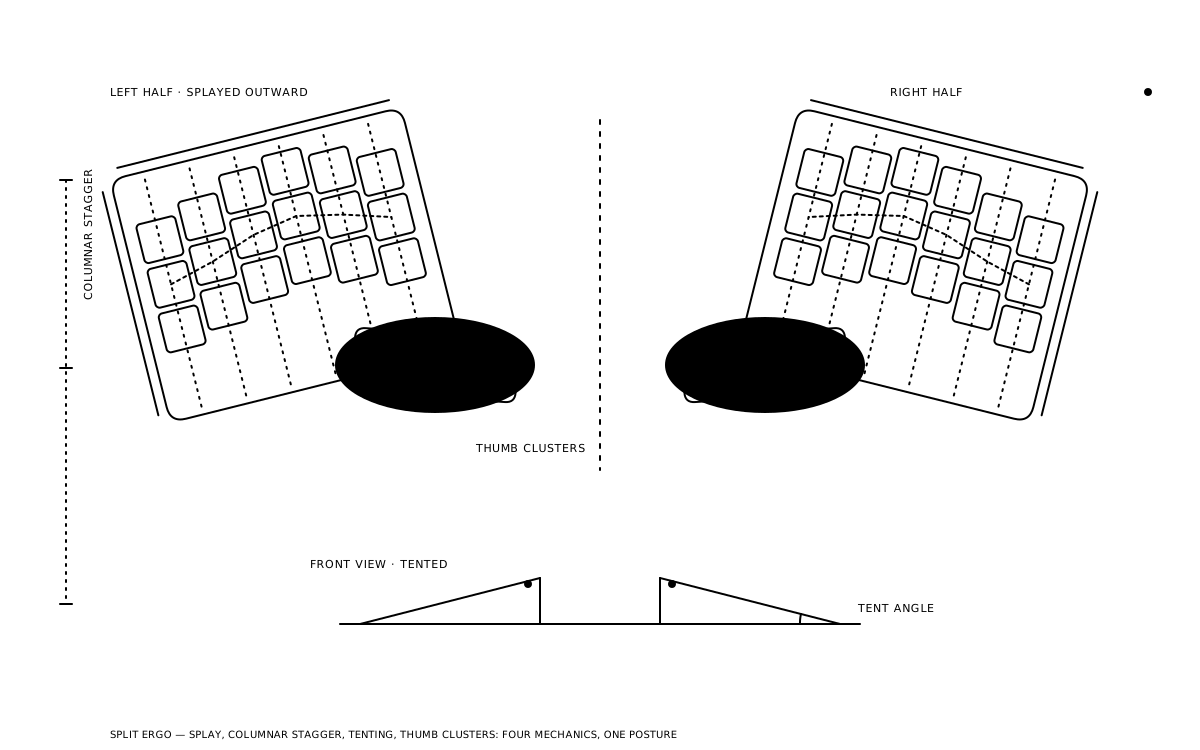
A flat, row-staggered keyboard asks the hands to do three things at once that none of the joints involved were built for. The split/ergo category is not one invention that undoes all three — it is several separate geometric corrections, each aimed at one of them, that vendors bundle in different combinations under a single word. This piece takes the bundle apart. For which board to buy, see the split and ergonomic buyer's guide; this is about what the geometry does to the arm once it is on the desk.
Three deviations, three fixes
Ergonomists describe wrist posture at the keyboard along three axes. Ulnar deviation is the sideways bend toward the pinky — the angle the wrists make when both hands converge on a board narrower than the shoulders. Pronation is the forearm rotation that turns the palms to face the desk. Extension is the upward bend at the wrist from a back edge sitting higher than the front, or from a thick board on a desk that is already too high.
Each axis has its own correction, and the corrections are largely independent. Splitting the board — or angling the halves apart inside a monoblock, which is what Alice-style cases do — opens the angle between the hands and attacks ulnar deviation. Tenting, called gable in the literature, raises the inner edge of each half so the palms face partly toward each other and attacks pronation. Slope handles extension: flattening the board, reversing its tilt, or making it thin enough that the wrist never has to climb to the home row.
The numbers behind those corrections are older than most of the boards using them. Marklin and Simoneau's posture study, published in Human Factors in 2000, found a properly set up split brought mean ulnar deviation from roughly 12 degrees to within 5 degrees of neutral. Rempel's 2009 study on split-keyboard geometry refined that: a mid-range opening angle of about 15 degrees was the best trade, enough to cut ulnar deviation without driving up pronation or pushing the elbows apart. Open the halves too far and the forearms rotate to follow them — the second deviation arriving to replace the first.
Row stagger is a typebar artifact
It is worth being precise about what the conventional layout is being corrected from. The diagonal stagger on a standard board — each row offset from the one above by a half key, a quarter key, and a half key descending from numbers to Z — did not come from any study of the hand. It came from the typewriter. Each key on an upstrike machine drove a typebar through a lever linkage, and adjacent linkages needed clearance so the bars would not foul one another on the way to the platen. Offsetting the rows gave every lever its own lane. Deskthority's entry on staggering traces the convention to that linkage problem and nothing else.
Electronic keyboards removed the linkage in the 1960s and kept the stagger because the installed base of trained typists was already enormous. The consequence is a diagonal that runs the same direction under both hands: the left reaches up-and-left, the right reaches up-and-right. Fingers do not extend diagonally. They extend straight.
Columnar stagger follows the finger, not the lever
Columnar stagger replaces the horizontal row offset with a vertical column offset. The middle-finger column sits highest, the ring and index columns step down, and the pinky column sits lowest — the profile a relaxed hand draws on a flat surface. Keys sit in straight vertical lanes, so an extended finger lands on the key above home without drifting sideways.
The vendor rationale is blunt about the mechanism. ZSA's Voyager page puts it in one line: when you extend a finger, it doesn't go sideways. MoErgo's ergonomics page for the Glove80 describes the same goal from the wrist's end — columns arranged to minimise sideways finger movements and the compensating wrist "wriggling" that a row-staggered board forces whenever a finger lands off its lane.
What columnar stagger does not do is touch any of the three wrist deviations directly. It changes finger travel, which is why a flat, unsplit columnar board feels only modestly different at the wrist and radically different at the fingertips.
Thumb clusters move load off the weakest fingers
A conventional layout gives the thumb one key and routes enter, backspace, shift, and most modifiers to the pinkies, the weakest and least independent digits on the hand. Split and ergonomic boards reverse that allocation. Kinesis, whose Advantage line has carried a thumb cluster since the 1990s, states the rationale directly: use stronger thumbs rather than weaker pinkies to access heavily used keys like Space, Backspace, and Enter. MoErgo's Glove80 technical specification lists a six-key, two-row curved cluster per hand, reachable by drawing an arc with the thumb rather than stretching it.
The mechanism is load redistribution, not posture correction. Whether it produces fewer symptoms is the part the research has not isolated — the split and tenting studies measure wrist angle, not per-finger load, and the thumb cluster usually arrives bundled with every other change at once.
Key wells and the travel argument
The most committed version of columnar stagger bends the columns into a bowl. The Kinesis contoured line introduced the concave key well commercially; Matt Adereth's open-source Dactyl made it parametric, exposing row curvature, column curvature, tenting, and column offsets as numbers in an OpenSCAD model anyone could print; the Glove80 brought the same geometry to a low-profile wireless production board. In each, the far row curls up to meet the fingertip at the end of its extension.
The claim is travel reduction. Kinesis says the well shortens key reach and reduces over-extension; MoErgo says it follows the curves your fingertips draw when you curl your fingers. Both are plausible mechanical statements. Neither vendor publishes the measured finger excursion behind them, and the independent literature on key wells is far thinner than on split and tent. The well has the strongest intuitive case in the category and the weakest published one.
Choc versus MX spacing
The spacing decision cuts across all of the above. MX-spaced boards place switches on a 19.05 mm pitch in both directions. Choc-spaced boards — built around Kailh's low-profile Choc v1 — tighten that to 18 mm by 17 mm, with keycaps around 17.5 by 16.5 mm so they do not touch. PandaKB's spacing guide documents both standards.
Two millimetres per row is a travel reduction in the same direction the key well is chasing, achieved on a flat plate. The Voyager and the Glove80 are both Choc-spaced for that reason as much as for thinness; the Glove80's lowest key sits 20 mm from the desk to the top of the keycap, which is the extension fix arriving through profile rather than slope. The trade is keycap supply: Choc spacing locks a board out of the MX keycap ecosystem, and a Dactyl or an Advantage360 built on MX keeps that ecosystem at the cost of a taller, wider well.
The learning curve is measurable
Every transition post reports a productivity dip; the research puts a shape on it. Anderson, Mirka, Joines, and Kaber's 2009 learning-curve study in Human Factors had sixteen participants repeatedly type a standard passage on four alternative keyboards and measured completion time against a 40-second QWERTY baseline.
By the fifth trial the split fixed-angle keyboard was at 42 seconds — essentially baseline. The contoured split, a Kinesis-style well with a thumb cluster, was at 69. Dvorak was at 181 and a chord keyboard at 346. The authors' explanation is the useful part: the split fixed-angle board demanded only physical relearning, while the other three layered cognitive relearning on top.
That maps onto the hobby's experience. A split that keeps row stagger costs days. A columnar split with a thumb cluster costs the two-to-four weeks the transition posts converge on, because the key map changed, not only the hand position. Add a new alpha layout and home-row mods and the build lands closer to the Dvorak bar than the split one.
How much of this is evidence-backed
Honest accounting: the posture claims are well supported, the symptom claims are supported but underpowered, and the travel and load claims are mostly vendor reasoning.
Rempel's 2007 six-keyboard study, run on 105 subjects and published in Applied Ergonomics, is the cleanest data point. It tested conventional, laptop, 6-degree split, and three 12-degree split boards with 8- and 14-degree gables and 0 or -7 degrees of slope. The most neutral overall posture came from the 12-degree split, 14-degree gable, zero-slope configuration; the negative slope did best on pronation specifically. The conventional boards produced the fastest typing, and subjects still preferred the split-and-gable designs — posture and speed are not the same axis.
The split fixes ulnar deviation. The tent fixes pronation. The slope fixes extension. Nothing in the literature says any one of them fixes the others.
Baker and Cidboy's 2006 meta-analysis of six crossover trials, 182 participants in total, found large effects for split designs on ulnar deviation and for adjustable tented designs on pronation, a mixed picture on extension, and no single design that moved all three. The review's own commentary flagged the pooled sample as underpowered. That is the state of the evidence: the direction is consistent, the magnitudes are modest, and the link from a straighter wrist to fewer symptoms is an inference the field makes rather than a result it has measured at scale.
The tenting ranges on shipping boards reflect that gap. The Glove80's user guide covers roughly 25 to 30 degrees on its threaded feet and tells owners to wait a few days before adjusting at all; the Advantage360 offers three fixed positions; the Voyager ships magnetic legs for a shallow tent and a tripod mount for anything steeper. The studies cluster around 14 degrees of gable. The vendors leave room well above it, because a study measures an average across a hundred typists and an owner has one pair of shoulders.
What to watch
Two gaps in the evidence are worth watching. The first is per-finger load. Thumb clusters and key wells are sold on reducing what the pinkies and fingertips do, and no published study has instrumented that claim on a production board — the first one that does will either confirm the category's strongest intuition or embarrass it. The second is the learning-curve data's age. The 2009 study predates Choc spacing, home-row mods, and the layer-heavy keymaps ZMK and QMK made routine; a replication on a columnar split would land somewhere between the contoured-split and Dvorak bars, and knowing where would turn "budget three weeks" from folklore into a figure.
Until either lands, the practical reading holds: identify the deviation that hurts, buy the one geometry that addresses it, and treat everything past that — well, cluster, pitch — as a finger-travel argument the research has not caught up to.
Keep reading
- Guides
Split and ergonomic keyboards: a buyer's guide
Split doesn't automatically mean ergonomic, and ergonomic doesn't automatically mean split. Before spending money on either, a reader needs to know which of four separate design choices they're actually buying — and which one of them is solving their problem.
thock9 min read - Deep Dives
What a TMR sensor is actually measuring under a magnetic switch
Keychron's Q16 HE 8K and Cherry's XTRFY TMR boards get covered as a new switch generation. The real change sits a few millimeters below the magnet — a tunnel junction reading field strength through resistance instead of voltage, with a noise floor low enough to matter at the shallow end of the stroke.
thock11 min read - Deep Dives
PCB flex cuts, explained: a flex budget milled straight into the board
No plate change, no gasket, no case redesign — just a slot routed through the fiberglass near a switch hole. Flex cuts are the cheapest lever a designer has for adding give to a board that otherwise has none, and the cheapness is exactly why they show up where they do.
thock10 min read - Deep Dives
Rapid trigger is a firmware algorithm, not a switch spec
A rapid-trigger switch is not a special switch. It is an ordinary analog sensor wired to a polling loop that redraws its own actuation point every cycle — and that loop, not the sensor, is where the real engineering happens.
thock9 min read