Stabilizer servicing: the one step most builders skip
Most builders lube their switches meticulously and treat stabilizers as an afterthought. The rattle that survives a full stab lube job almost always traces back to one overlooked contact point.
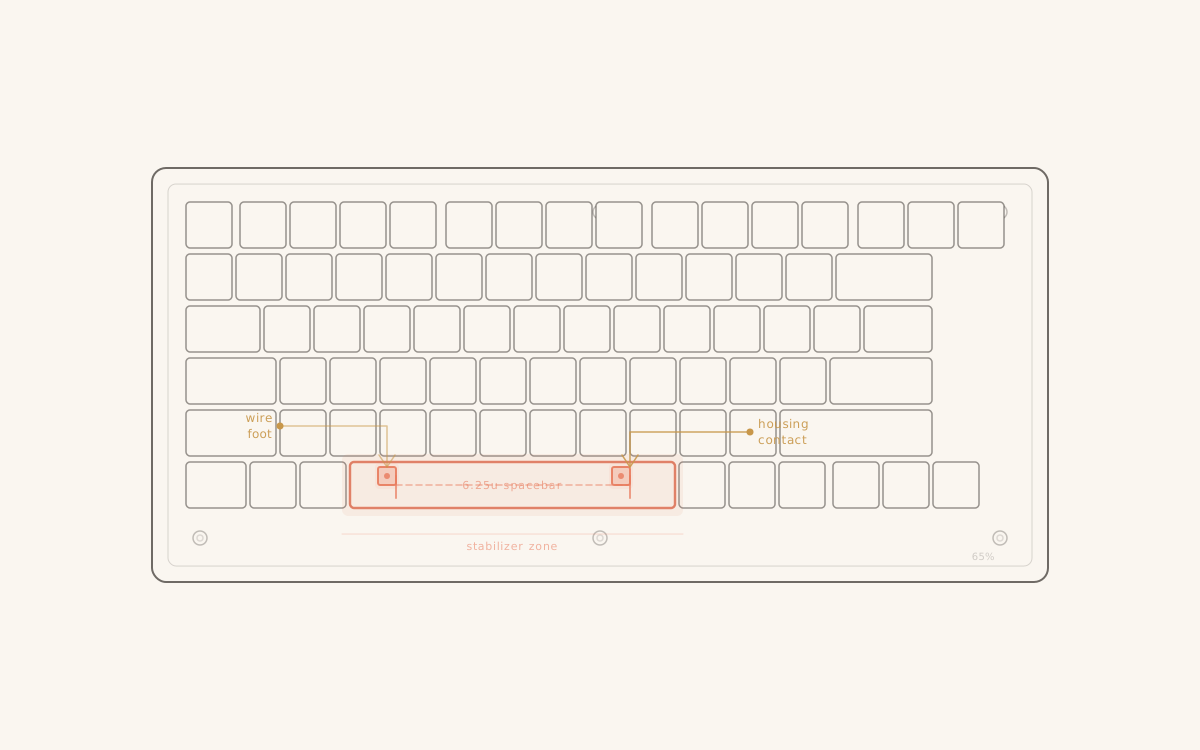
Stabilizers are not complicated components. Two wire ends, two plastic stems, two housings anchored to the PCB — the entire mechanism fits in a fingernail's worth of space. And yet stabilizer rattle is one of the most persistent problems in mechanical keyboard builds, precisely because it has three or four separate sources that all need addressing, and the last one is almost always skipped. If you want the foundational guide on what stabilizers are, the different mounting types, and the rattle mechanics before getting into service steps, start with Stabilizers explained.
Why stabilizers rattle
The rattle in an unserviced stabilizer is not one sound. It is at least three sounds stacked on top of each other, and a lube job that addresses only the obvious ones will leave the third intact.
The loudest source is the wire itself. Screw-in stabilizer wires flex slightly as they turn the corner between the housing barrels, and where the wire contacts the inside of the housing barrel, any dry metal-on-plastic contact produces a grinding or clicking sound with each keystroke. This is the rattle that most builders encounter first and address first — lubing the wire ends into the housing barrels is step one for anyone who has read any stabilizer guide.
The second source is the stem-to-housing interface. The stabilizer stem slides in the housing bore, and like a switch stem in its housing, it produces noise when the surfaces are dry. This one gets addressed in most builds because it is spatially obvious: the stem is right there, the housing is right there, and applying a thin film of lube inside the housing bore is a natural next step.
The third source is the one that survives both of those fixes: the wire-to-stem contact point. The wire hooks into a slot in the bottom of the stabilizer stem, and that small hook-in-slot joint moves slightly on every keystroke — vertically as the key travels down, laterally as the wire flexes. A dry hook rattles in its slot. The wire-barrel contact can be perfectly lubed and the stem-bore can be perfectly lubed, and this single dry joint will still produce a faint but detectable clunk on every bottom-out.
The step most builders skip
Past the wire-barrel lube and the stem-bore lube, there is a fourth contact point that almost no build guide mentions: the feet of the stabilizer housing, the two small posts or tabs that anchor the bottom of the housing to the PCB surface.
On screw-in stabilizers, this is the plastic foot that sits against the PCB when the housing is screwed down. On clip-in stabilizers, it is the plastic clip tab. In either case, the housing bottom is in direct, firm contact with the PCB during every keystroke — and it is dry contact.
When a large key (spacebar, left shift, backspace) bottoms out hard, the keystroke force passes through the keycap, through the switch, through the PCB, and also through the stabilizer housing into the PCB at those two feet. Dry plastic on PCB substrate produces a faint but real contact noise. After a careful wire-lube and stem-lube job, this is often the only remaining sound in the acoustic path — and it reads as a subtle, slightly hollow clunk that sits just under the keystroke rather than on top of it.
The fix is straightforward: apply a thin layer of dielectric grease to the underside of the housing feet before screwing or clipping the housing to the PCB. The grease couples the plastic to the PCB surface, damps the contact point, and eliminates that last transmission path.
Lube selection
The right lube for a stabilizer component depends on the material and the load. Using a single lube everywhere is a common mistake, and it is why some builders find that a freshly lubed stabilizer feels sluggish on large keys.
Wire ends into housing barrel: dielectric grease, applied generously. Dielectric grease is a thick, non-conductive silicone compound that stays in place under load and does not migrate or dry out over time. The wire-barrel contact is a high-friction, high-load interface, and dielectric grease handles it well. The caveat is quantity: too much dielectric grease in the barrel makes the wire sticky and slows the return travel on large keys. The standard applied thickness is roughly a match-head's worth of grease per barrel, worked in with a small brush or the wire tip itself. More than that and spacebar return becomes noticeably sluggish.
Stem bore and stem inner walls: Krytox GPL-205 G0. The same lube used on switch stems works well here — it is thin enough not to impede stem travel, reduces friction effectively on the plastic-on-plastic sliding surfaces, and does not interact badly with the housing material. Apply a thin film to the inside of the housing bore where the stem travels, and to the outer surface of the stem cylinder.
Wire hook-in-stem slot: dielectric grease, thin application. The hook joint is doing a different job than the barrel — it is not sliding, it is flexing slightly — so the thicker grease is appropriate here too. A very small amount applied to the hook itself and worked into the slot is sufficient. This is the joint that most builders miss because it requires pressing the stem down to expose the hook fully.
Housing feet (the step most builders skip): dielectric grease, very thin application. The goal is acoustic coupling, not lubrication — these surfaces are not sliding relative to each other. A thin smear on the housing foot before mounting is enough.
Wire balancing
A well-lubed stabilizer that still wobbles on a long key is usually a bent wire issue. The wire should be straight along its horizontal run, with the two end legs at exactly equal lengths and perpendicular to the horizontal span. A wire that is even slightly bent or asymmetric in leg length will produce a stabilizer that drops one side of the key before the other, creating a rocking motion on every keystroke.
Straightening a bent wire is a matter of working it against a flat surface — a desk edge or a ruler — with gentle, repeated pressure. Do not try to bend it back to straight in one motion; that introduces a counter-bend. Work slowly and check frequently by rolling the horizontal span against the desk to find any remaining bow.
Leg length is harder to correct once it is off, but it is easy to check before lubing: hold the wire horizontal against a flat surface and confirm both legs are the same length and sit perpendicular to the span. If they are not, a pair of flat-nose pliers and patience can bring them into alignment. The tolerance required is not precise — it does not need to be machined — but both legs need to be close enough that they seat fully into the housing barrels at the same depth.
Full servicing workflow
Putting the steps in order:
- Remove stabilizer housing from PCB (unscrew or unclip).
- Disassemble the housing: pull the stem out of the bore.
- Remove the wire from the housing barrels.
- Inspect the wire for bends and asymmetric leg length. Correct before lubing.
- Apply dielectric grease to both wire ends (barrel contact area). Work it into the wire tip.
- Apply GPL-205 G0 to the inside of the stem bore and the outer surface of the stem cylinder.
- Reassemble: seat the stem in the bore, hook the wire into the stem slot.
- With the stem pressed down (exposing the hook joint), apply a small amount of dielectric grease to the hook-in-slot joint.
- Apply a thin smear of dielectric grease to the underside of the housing feet.
- Install the housing onto the PCB. Screw or clip it down firmly.
The correct order matters mostly for step 8 — the hook joint is not accessible unless the stem is pressed down. Skip that step and the lube never reaches the joint.
| Component | Lube | Amount |
|---|---|---|
| Wire barrel (inside) | Dielectric grease | Match-head per barrel |
| Stem bore (inside) | GPL-205 G0 | Thin film |
| Stem cylinder (outside) | GPL-205 G0 | Thin film |
| Wire hook-in-stem slot | Dielectric grease | Small amount |
| Housing feet | Dielectric grease | Very thin smear |
Diagnosing rattle after servicing
A stabilizer that still rattles after a full service job with correct lubes is almost always one of three things.
The housing feet were skipped. This is the most common cause of a subtle clunk that persists after everything else is addressed. Disassemble the housing from the PCB, apply dielectric grease to the feet, reinstall. The sound should change immediately.
Wire leg length is asymmetric. One side of the key drops before the other; the imbalanced travel produces a rocking sound distinct from wire-barrel rattle. Pull the keycap, watch the key drop, and check whether both sides of the stabilizer descend at the same rate. If not, the wire needs adjustment.
Insufficient lube in the wire barrel. The dielectric grease can migrate away from the contact zone over time if the initial application was thin. Disassemble and reapply with slightly more grease — just short of the point where return travel becomes sluggish.
What stabilizer rattle is not, after a correct service job, is a switch problem. The distinction matters because some builders attribute rattle to their switches and reach for switch mods when the stabilizer is still the source. The diagnostic test: actuate the stabilized key with just enough force to engage the switch but not bottom it out fully. Partial-travel actuation that engages the switch but barely moves the stabilizer wire will isolate whether the sound is switch-origin or stabilizer-origin.
What to expect
A correctly serviced set of stabilizers is not silent — there is still some mechanical action happening at the wire-barrel interface that no amount of lubing fully removes. What it should be is consistent: a uniform, slightly dampened bottom-out on every stabilized key, with no secondary rattling transient on top of it.
On linears, the absence of stabilizer rattle is most obvious because the switch itself contributes almost no noise beyond a clean bottom-out. A well-tuned linear on a well-lubed stabilizer should land as a single, uniform thock — no rattle before or after the impact, no asymmetric drop on the key edges, no clunk that sits below the keystroke.
The housing foot step costs thirty seconds and a fingertip of dielectric grease. It is genuinely the last place most builders look, and on a well-tuned build, it is often the difference between a stabilizer that sounds good and one that sounds finished.
Builders who have their stabilizers sorted and want to address the rest of the acoustic chain — case foam, switch pads, tape mod — will find a ranked breakdown in the sound dampening guide. Builders doing a stab service session often combine it with switch mods in the same pass — the board is open, and switch films or spring swaps cost nearly nothing in additional time when the setup work is already done. Builders wondering why a stabilizer rattle that ruins a workday does not appear in a typing test score will find the argument in why typing tests lie.
Keep reading
- Ideas
Lubing switches: what to use, how much, and what to skip
Four lubes, four application points, and one rule that prevents most mistakes: over-lubing is irreversible, under-lubing is not. Here is the practical reference.
thock10 min read - Ideas
The tape mod: what one strip of Kapton actually does
Three to five strips of painter's tape on the back of your PCB — that's the whole mod. The acoustic effect is real. Its magnitude depends almost entirely on the board underneath it.
thock10 min read - Guides
Stabilizers explained: from stock rattle to silent smoothness
Stabilizers are the most acoustically influential component most builders treat as an afterthought. Understanding what they are and why they fail changes every build that follows.
thock12 min read - Ideas
Hot-swap sockets: what you actually give up for the convenience
Tool-free switch swapping turned hot-swap PCBs into the default spec across the hobby, and the default is earned. Here is the honest, specific list of what a socket costs against a soldered joint — and the two cases where soldering is still the right call.
thock8 min read