Hot-swap sockets: what you actually give up for the convenience
Tool-free switch swapping turned hot-swap PCBs into the default spec across the hobby, and the default is earned. Here is the honest, specific list of what a socket costs against a soldered joint — and the two cases where soldering is still the right call.
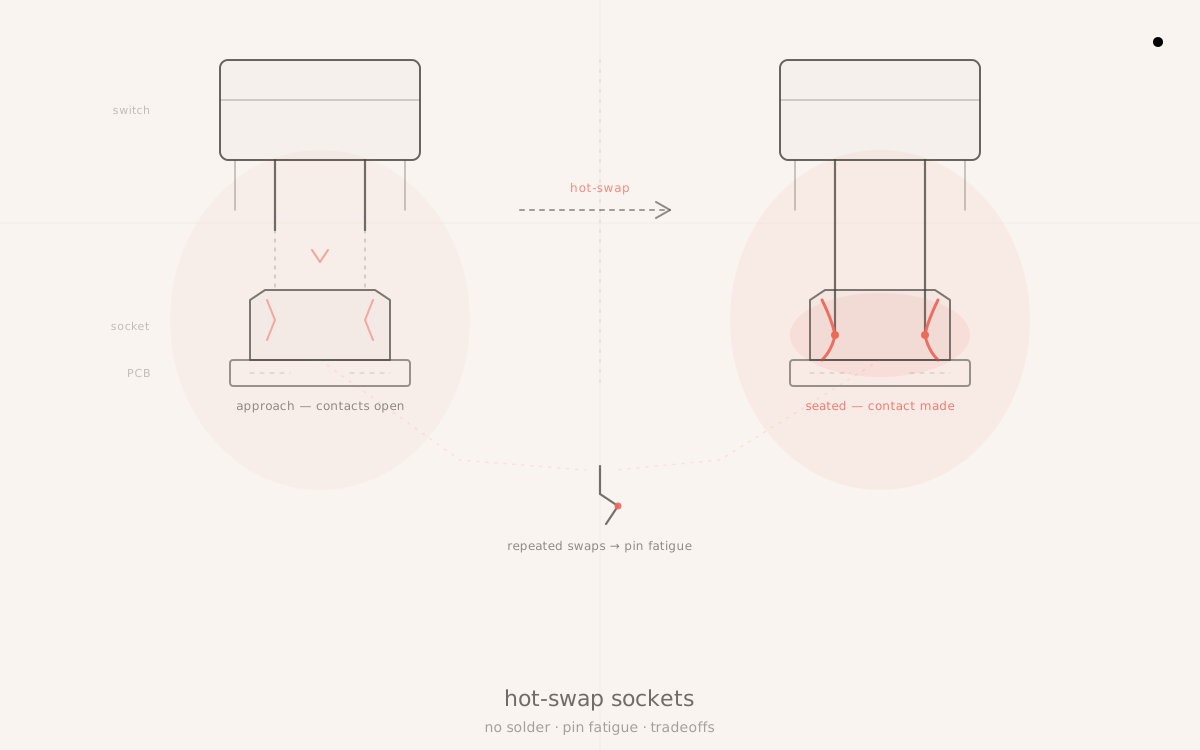
Pop ten switches out, drop in ten different ones, no soldering iron in sight — that is the entire pitch for hot-swap, and it is true. What the pitch leaves out is the short, specific list of things a socket is actually worse at than a soldered joint. The list is short. It is also real, and worth knowing before treating a hot-swap board as a soldered board with a bonus feature bolted on.
What a socket actually is
A hot-swap socket is a small spring-contact receptacle soldered to the PCB in the same footprint a switch's legs would otherwise be soldered into directly. Instead of a switch's two metal legs going straight into plated through-holes and getting flowed with solder, the legs slide into a receptacle that grips them under spring tension. Kailh hot-swap sockets and Gateron hot-swap sockets are the two designs that dominate the market, and functionally they do the same job: hold the leg under enough pressure to maintain continuous electrical contact without forming a permanent bond.
The reason the socket exists is entirely about iteration speed. Before hot-swap, trying a different switch meant desoldering the old one, clearing the through-hole, and soldering in the new one — a process that takes real time per switch and risks lifting a pad on a cheap PCB if it is rushed. A socket collapses that to pull-and-push. A full-board switch trial that used to be an evening with an iron is now closer to ten minutes with a switch puller.
What the socket costs, physically
The socket does the job electrically. It is not, however, a free feature. Three costs are real.
Stack height. A hot-swap socket sits proud of the PCB by roughly a millimeter or two, since the switch's legs terminate inside the socket's body rather than flush against the board surface. On most cases this is invisible — the internal clearance between PCB and plate, and between PCB and case bottom, already accounts for it in the design stage. But on a handful of genuinely low-profile builds, or when a builder retrofits a socketed PCB into a case that was originally designed around a soldered version of the same board, that extra millimeter or two is not guaranteed to be there. Check case clearance before assuming a hot-swap PCB drops into any enclosure built for the soldered variant of the same design.
Connection reliability over years of use. A soldered joint is a single fused connection; barring physical damage to the board, it does not degrade with use. A socket connection is a spring holding two metal surfaces together under tension, and spring tension is exactly the kind of thing that can, very slowly, loosen or develop contact resistance across years of insertion cycles and ordinary oxidation exposure. In practice this is rare, not common — most hot-swap boards run for years without a single socket acting up. But rare is not never, and when it does happen the symptom is usually a switch that intermittently double-types or drops a keystroke, which is a genuinely confusing thing to diagnose the first time, because the instinct is to blame the switch rather than the socket underneath it.
Bent or damaged pins. This is the failure mode that actually happens with some regularity, and it is self-inflicted rather than a materials defect. Switch legs are thin, and a socket's receptacle channel is a tight, straight-line fit. Pulling a switch out at an angle, or levering it out against the housing edge with a fingernail or a flathead screwdriver instead of using a proper puller, puts side-load on the legs and can bend the socket's spring contact — sometimes badly enough that the socket stops gripping the next switch reliably. This is the actual, common downside of hot-swap in practice. It is also entirely avoidable: seat a switch puller's jaws under the switch housing, not the stem, and pull straight up with even pressure. No rocking, no prying at an angle, no working one side loose before the other. A switch puller is built to apply vertical force evenly across both sides of the housing at once; fingers and screwdrivers are not.
The soldered side of the ledger
None of this makes a soldered PCB strictly better. A soldered joint has a marginally lower failure surface than a socket — there is no spring contact to fatigue over years, no insertion cycle to account for, nothing to bend on removal because there is no removal. What a soldered PCB gives up in exchange is total: no swapping, no trying a new switch on a whim, no fixing one bad switch without an iron and a desoldering pump on hand. If a switch on a soldered board fails years into ownership — a rare event, but not a nonexistent one — replacing it is a desoldering job, which is a skill and a time investment most casual builders simply do not keep in reserve.
Two absolutist takes, both wrong
The first bad take is "hot-swap ruins long-term durability." It does not. The socket failure modes above are real but rare, and the dominant one — bent pins — is a technique problem with a specific, learnable fix, not an inherent weakness of the socket design. Boards with hot-swap PCBs have been in daily service for years across the hobby without socket failure, and the ones that do fail almost always trace back to careless switch removal rather than the socket simply wearing out on its own.
The second bad take, more common among hot-swap boosters, is "there's literally no downside." There is. Stack height is a real design constraint some boards have to account for. Contact reliability, while rare as a failure, is not a property soldered joints have to worry about at all. And bent pins are common enough in practice that switch-puller technique deserves to be taught explicitly rather than assumed, which is exactly why it gets a callout above instead of a footnote.
The verdict
Hot-swap is the right default for the overwhelming majority of builders, and it earned that position honestly. The ability to try switches before committing 65 or 110 of them to a board, to fix a single bad switch in thirty seconds, and to rebuild a board's feel entirely without an iron is worth more to most people than the marginal reliability edge a soldered joint holds in reserve. That is why hot-swap PCBs have become the standard spec across enthusiast and prosumer boards rather than a premium add-on. Just don't let a benchmark make that call for you — typing tests lie about what a switch feels like two hours into a real session, so judge each swap by feel at the keyboard, not by a leaderboard number.
Soldered PCBs still make sense in two specific, narrow scenarios. The first is a fixed, one-switch-forever office board — a builder who has already settled on a switch, has no intention of ever swapping it, and is optimizing purely for the lowest possible long-term failure surface with zero flexibility cost, because flexibility was never going to be used. The second is a genuinely low-profile board design where the millimeter or two of socket clearance does not fit the case geometry, and the engineering tradeoff runs the other way. Outside those two cases, the socket's convenience is worth its modest and well-understood costs.
Because a hot-swap board is already easy to open and close, it is also the cheapest window to knock out the other reversible mods that live in the same case cavity: the PE foam mod is two dollars of foam between the PCB and case bottom, the tape mod is a few strips of painter's tape on the same PCB, and neither touches a socket at all. If switches are already coming out to test feel, that is also the moment to run stabilizer servicing — the rattle that survives a full lube job almost always traces back to the one contact point most builders skip.
What to watch: switch-puller technique is the highest-leverage thing a hot-swap owner can get right, and it costs nothing to learn. Pair a hot-swap board with a decent puller and the habit of pulling straight up, and the socket's one common failure mode mostly disappears. For builders assembling their first board and deciding between a hot-swap and soldered kit, the custom keyboard kit buyer's guide and the beginner's switch buying guide both cover the decision in the context of a first build, where the case for hot-swap is close to airtight.
Keep reading
- Ideas
Why typing tests lie
Monkeytype scores reward fast and forgiving. A daily driver needs comfortable and honest. Optimizing a build for the test selects for the wrong things — and the gap shows up around hour two, not in the leaderboard.
thock7 min read - Ideas
The tape mod: what one strip of Kapton actually does
Three to five strips of painter's tape on the back of your PCB — that's the whole mod. The acoustic effect is real. Its magnitude depends almost entirely on the board underneath it.
thock10 min read - Ideas
The PE foam mod: the two-dollar upgrade that actually works
PE foam is one of the most accessible mods in the hobby — a $2 sheet between your PCB and case can noticeably reduce hollow resonance. Here is what it actually does, when to use it, and when to skip it.
thock10 min read - Ideas
Stabilizer servicing: the one step most builders skip
Most builders lube their switches meticulously and treat stabilizers as an afterthought. The rattle that survives a full stab lube job almost always traces back to one overlooked contact point.
thock11 min read