Keycap profiles, compared: Cherry, OEM, SA, and MT3
Most beginners agonize over switches for weeks, then drop any keycap set on top and discover the keycap was doing half the work all along. Profile shapes the sound, the typing angle, and the way a board reads on a desk — and the four profiles below cover almost every set on the market.
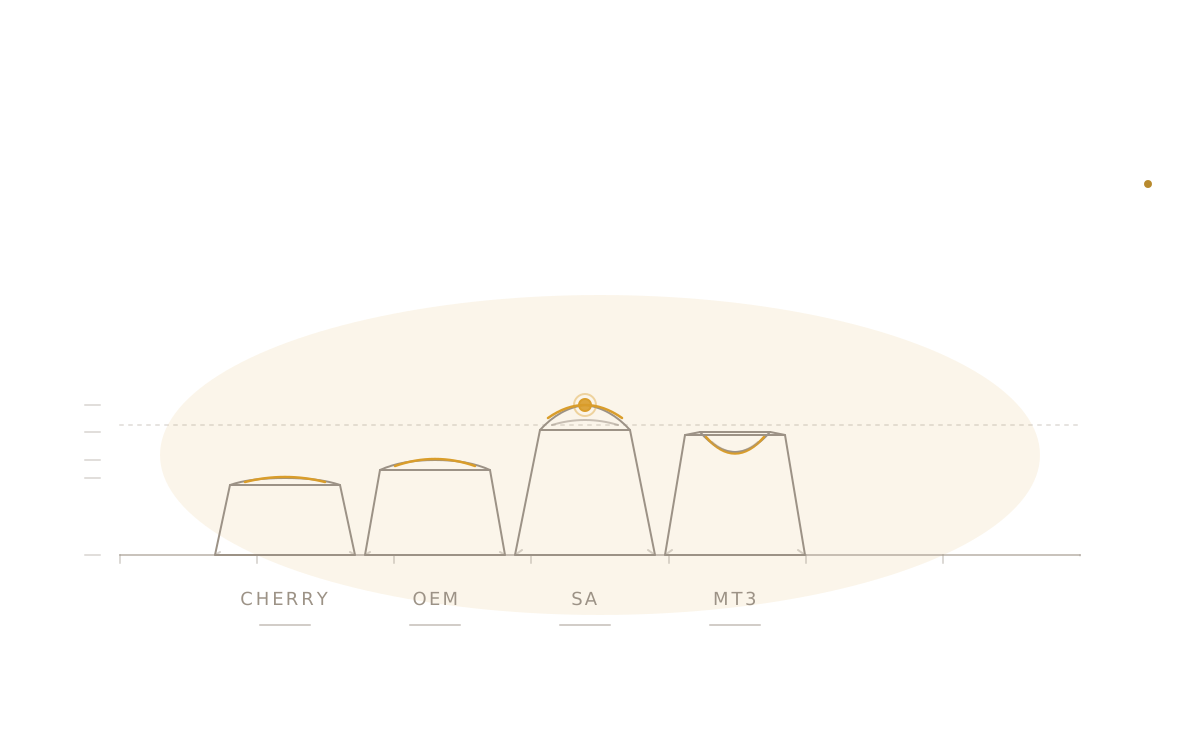
A first-time builder spends weeks reading switch reviews, watches a dozen sound tests, and finally commits to a set of linears. They build the board. It sounds thin. They tear it apart, lube the switches, rebuild. It still sounds thin. Then they swap the stock OEM caps for a thick double-shot set in a different profile and the board they were trying to build appears, fully formed, on the second press. The keycap was doing more than they thought.
Profile is the shape of the keycap as seen from the side: how tall it is, whether the top is flat or scooped or domed, and whether the cap on the number row is the same shape as the cap on the home row. It is the single biggest visual choice on a board, and it changes typing feel and sound more than most people expect. The market is dense, but the spine of it is four profiles. Learn those and almost every set in a vendor's catalog becomes legible.
The two axes that actually matter
A sculpted profile uses a different cap shape on each row of the keyboard. The number row tilts forward, the home row sits flat, the bottom row tilts back toward the typist. The point is to bring every row into the same plane for the fingers, so that reaching from Q to A to Z is one smooth arc instead of three steps up a staircase. A uniform profile uses the same cap shape on every row. There is no row dedication, every cap is interchangeable, and the typing surface is a flat plane rather than a curved one.
Height is the second axis. A low-profile cap like Cherry sits roughly 8mm tall at the front edge. A tall profile like SA or MT3 sits closer to 16mm. That doubling does two things. It changes the angle of attack — the wrist sits higher relative to the keys, and most typists end up wanting a wrist rest with tall profiles where they would not need one with Cherry. It also changes the acoustic chamber inside the cap. Taller caps have more internal volume, and that volume rings. The deep, hollow sound a lot of builders chase from MT3 or SA is partly the switch, partly the case, and largely the cubic millimeters of air trapped under each cap.
Hold those two axes in mind. The rest of the article is just four points on that grid.
Cherry
Cherry profile is the modern enthusiast default and has been for most of a decade. It is low — the shortest of the four profiles covered here — and sculpted, with a gently scooped top on each cap. The numbers, prices, and visual familiarity all point the same direction: most enthusiast sets sold today, including nearly the entire GMK catalog, ship in Cherry profile.
The sound is the reason. Cherry's low height means a small internal chamber, and a small chamber means very little resonance. A well-built board in Cherry-profile thick ABS reads as tight, focused, and what the community has settled on calling thocky — a low-pitched bottom-out without any hollow ring. GMK Bentō R2 is a canonical example: a thick double-shot ABS set, Cherry profile, the kind of thing a builder ends up with by default if they like the way most YouTube sound tests sound. GMK Olivia is the aesthetic counterpoint from the same era — a soft pink-and-cream set from 2018 that proved a non-traditional palette could anchor a community-defining design, and that Cherry profile would carry it without sacrificing the sound that makes it the enthusiast default. GMK Laser ran parallel — a deep-purple base with pink and teal legends, also 2018, anchoring the synthwave and retro-futurist aesthetic that still commands aftermarket premiums today. Cherry's other advantage is invisible: the profile is so widely supported that nearly every novelty, ortho kit, and 40% kit is available for it.
The typing angle is shallow. A typist coming from a laptop or a stock factory keyboard usually feels at home on Cherry within a day. There is very little to retrain.
OEM
OEM is the profile on almost every factory-built keyboard ever sold. The cap on a Logitech, a Corsair, a Ducky, a Keychron in its stock configuration — all OEM. It is sculpted like Cherry, but a few millimeters taller and with slightly steeper side walls. The typing angle is a touch more aggressive. The top scoop is shallower.
This is the profile enthusiast writeups dismiss as the boring one, and that dismissal is mostly unfair. OEM is familiar in the way a well-worn pair of shoes is familiar. A typist who has done their last twenty years on factory keyboards will feel a difference moving to Cherry — small, but real — and not all of them prefer the new feel. There is a category of typist who tries Cherry, finds it slightly cramped, and goes back to OEM. They are not wrong; they have just calibrated to the taller cap over a long career.
The reason to skip OEM in a first enthusiast build is not that it is bad. It is that the catalog is thin. The dense, design-forward, group-buy-driven part of the keycap market has consolidated around Cherry, and the OEM sets available tend to be either stock factory caps or budget aftermarket sets at the lower end of build quality. A typist who specifically wants OEM is better served by keeping their factory keyboard's caps than by hunting for a premium OEM set.
SA
SA is tall, sculpted, and spherical — the top of each cap is a small dished sphere rather than a cylindrical scoop. The profile dates to the 1970s and was rescued from obscurity by Signature Plastics in the modern era, which is why it carries the vintage character it does. Older typists describe SA as feeling like a real machine; younger typists usually describe their first SA build as feeling like typing on dollops of ice cream. Both descriptions are accurate.
The sound is loud, hollow, and divisive. SA's combination of significant cap height, thick ABS walls, and spherical tops produces a high-pitched, ringing tone that some builders adore and some builders cannot stand. It is not subtle. A board in SA does not recede into the background of an open-plan office; it announces itself.
SA Godspeed is one of the most widely produced SA sets of the modern era — manufactured by Signature Plastics through Drop, it has introduced more builders to the profile than almost any other run and serves as the common reference point when someone asks what SA actually sounds and feels like.
The other consideration with SA is the sculpt. SA's row differentiation is dramatic — the number row leans forward at a steep angle, the bottom row tilts back, and getting them wrong is immediately and painfully obvious. Errant caps from a 1u-only kit ending up on the wrong row will read as actively broken. Buy SA only when the set covers every row needed for the layout.
MT3
MT3 is the profile Drop and Matt3o developed together, and it is now the dominant tall profile in the enthusiast scene. It is sculpted like SA, but the scoop on top of each cap is a deep cylindrical depression rather than a spherical dish. Fingers seat into the scoop. The row differentiation is even more pronounced than SA's — the home row caps are nearly flat, the number row leans hard forward, the bottom row leans hard back.
The sound is what sells MT3. Tall walls, thick ABS, deep scoop — the acoustic chamber inside an MT3 cap is large, and what comes out is the lowest, most resonant thock most builders have heard. People who describe a keyboard as sounding wooden, or hollow in a pleasing way, are usually describing MT3. Drop MT3 Dasher is the set most often cited as the canonical example, and Drop + Matt3o MT3 /dev/tty is the developer-themed cousin that introduced a lot of typists to the profile.
MT3 is not for everyone. The deep scoop locks the finger into a single position on each cap, which feels precise to some typists and confining to others. Touch-typists who pivot across keys quickly sometimes find MT3's row differentiation slows them down — the home row is so distinct from the bottom row that fingers stop guessing and start checking. A solid two-week adjustment period is normal.
Uniform profiles, briefly
Every profile above sculpts row-by-row. There is a parallel family that does not: DSA, KAT, and XDA all use the same cap shape on every row. Uniform profiles are flat in plane, easier to remap (a cap from the number row works fine on the home row), and tend to read more as a design object than a typing instrument. KAT Drifter is a representative KAT set — medium height, gently spherical top, no row dedication.
The other case for uniform profiles is non-standard layouts. On an ortholinear or 40% board, where the typist is remapping keys constantly and 1u caps end up everywhere, a uniform profile sidesteps the wrong-row problem entirely. A lot of split-keyboard builders default to KAT or DSA for exactly this reason. Uniform profiles are out of scope for the rest of this guide, but they are worth knowing as the fifth option if none of the sculpted four feels right.
What to actually buy first
If a beginner reads only one paragraph of this guide, it should be this one.
Buy Cherry unless there is a specific reason not to. The catalog is the largest, the prices span every budget, the sound is the modern default for a reason, and the low height means no retraining and no wrist rest. A Cherry-profile set in thick ABS is the lowest-risk first keycap purchase a builder can make. Builders who prefer PBT durability over ABS gloss will find the same profile and similar acoustics in sets like the Domikey WOB, a white-on-black evergreen utility set praised for its legend consistency and resistance to shine over extended use.
Buy MT3 if the goal is the deep, hollow sound that drew the builder to the hobby in the first place — and if they are willing to spend two weeks adapting to the deep scoop. Buy SA only if the vintage character is the point and the typist has spent time on a friend's SA build first. Skip OEM unless the typist specifically prefers their existing factory keyboard's feel and wants to keep it.
The wrong move is to buy two or three sets at once to compare. Keycaps are not switches — there is no tester block, and a full set is expensive enough that a stack of three sets in a closet is a real loss. Pick one. Live with it for a month. The hobby will still be here when the next set drops.
Closing
Switches set the gait of a keyboard — how the press starts, how it ends, what the finger feels at the bottom. Keycaps set the timbre — how the press sounds in the room, how the board reads to the eye, how the typing surface meets the hand. A board with great switches and stock OEM caps will always sound like a factory keyboard with great switches. A board with mid-tier switches and a thoughtful Cherry or MT3 set sounds like the builder meant to build a keyboard. The profile is the voice. Choose it on purpose. Profile is one axis of the keycap decision — for the other, how the plastic itself sounds, wears, and ages, see Keycap materials, compared. For the switch half of the pairing — how to find the right family and feel — see choosing your first switch.
Keep reading
- Ideas
Mixing keycap profiles on one board: what actually works
Mixing profiles reads as a deliberate design choice or a rookie mistake depending entirely on where the swap lands. A handful of zones tolerate it well. The alpha block almost never does.
thock6 min read - Guides
Artisan keycaps: a practical buying guide
A single sculpted cap on the Escape key can cost more than the switches underneath it, and the buying process looks nothing like ordering a keycap set. Here is what an artisan actually is, how the raffles work, and the one check that keeps a buyer from winning a cap their board can't use.
thock9 min read - Guides
ANSI, ISO, or JIS: a practical layout buying guide
Two boards can look nearly identical in a listing photo and still take entirely different keycap sets. Here's how to read Enter key shape, bottom-row widths, and spec-sheet shorthand before ordering — not after a set arrives that doesn't fit.
thock9 min read - Guides
Keycap materials, compared: ABS, PBT, and the rest
Most builders obsess over switches and quietly accept whatever keycaps came in the box, then wonder six months in why their board doesn't sound like the YouTube video. Half the answer is the plastic. Material decides how a cap rings, how it ages, and what it feels like under a fingertip on day one and day one thousand.
thock10 min read